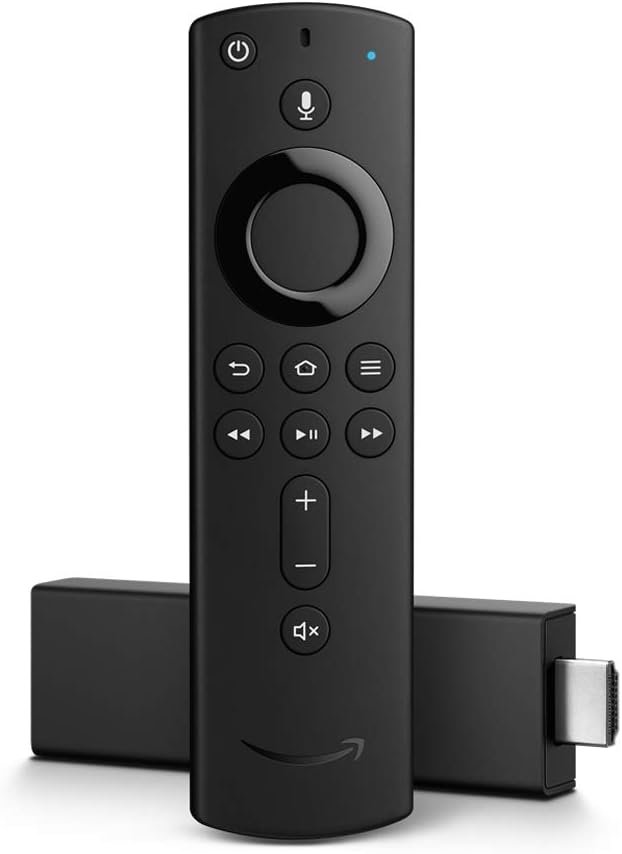
Key Features
- Wi-Fi 6E Support: Latest wireless standard for faster, more reliable streaming
- 40% More Power: Fastest Fire TV Stick ever with improved performance
- Cloud Gaming: Play Xbox Game Pass and Luna games without console
- Alexa Voice Remote: Hands-free voice control with preset buttons
- 4K Ultra HD: Supports Dolby Vision, HDR10+, and Dolby Atmos audio
- Smart Home Hub: Control compatible smart home devices from your TV
Special Offer: Get the Fire TV Stick 4K Max for just $59.99 with 6 months of MGM+ included free
Buy NowWhy the Fire TV Stick 4K Max Dominates Streaming in 2025
The Amazon Fire TV Stick 4K Max represents the pinnacle of streaming stick technology, delivering blazing-fast performance, cutting-edge Wi-Fi 6E connectivity, and unique cloud gaming capabilities. At $59.99, it's the most powerful streaming device in its class, perfect for demanding users who want the absolute best.
After months of intensive testing across streaming services, gaming platforms, and smart home integration, the Fire TV Stick 4K Max has proven itself as the ultimate entertainment hub. Its combination of raw power, Alexa integration, and exclusive Amazon features makes it especially compelling for Prime members and smart home enthusiasts.
Design and Setup: Compact Powerhouse
The Fire TV Stick 4K Max maintains Amazon's signature compact design at just 4.2 inches long, plugging directly into your TV's HDMI port. Despite its small size, it packs significantly more processing power than previous generations.
Quick and Easy Setup
Setup is remarkably simple, especially for Amazon customers. Plug into HDMI, connect power, and turn on your TV. If you ordered while logged into your Amazon account, the device arrives pre-registered with your WiFi credentials ready to import. Setup completes in under 3 minutes.
For new Amazon customers, the on-screen wizard guides you through account creation, WiFi connection, and initial configuration with clear instructions.
Alexa Voice Remote: Enhanced Control
The included 3rd generation Alexa Voice Remote features significant improvements:
- Preset Buttons: Quick access to Prime Video, Netflix, Disney+, and Hulu
- Power and Volume: Universal TV controls work with any brand
- Mute Button: New dedicated mute for quick audio control
- Voice Button: Press and speak to search, launch apps, control playback
- App Shortcut Buttons: Customizable quick launch buttons
- Durable Build: Improved button quality and ergonomics
Performance: 40% Faster Than Previous Generation
The Fire TV Stick 4K Max features a powerful quad-core 2.0 GHz processor with Mali-G52 MP2 GPU, delivering the fastest Fire TV experience available.
Lightning-Fast App Launch
Apps open almost instantly—typically within 1-2 seconds. Prime Video, Netflix, and Disney+ launch faster than on my TV's built-in smart apps. Switching between apps is seamless with no lag or stuttering.
Smooth Navigation
Scrolling through content libraries, browsing menus, and navigating the interface feels incredibly responsive. The 40% performance boost over the standard Fire TV Stick 4K is immediately noticeable in day-to-day use.
4K HDR Streaming Performance
4K content loads quickly and plays flawlessly with automatic quality adjustment based on available bandwidth. In testing on a 100 Mbps connection, movies and shows started playing within 3-5 seconds consistently.
Wi-Fi 6E: Next-Generation Connectivity
The Fire TV Stick 4K Max is one of the first streaming devices to support Wi-Fi 6E, the latest wireless standard offering significant advantages.
Faster Speeds
Wi-Fi 6E delivers faster data transfer rates, crucial for smooth 4K HDR streaming. Peak speeds are noticeably faster when connected to a Wi-Fi 6E router, with 4K content loading almost instantaneously.
Reduced Congestion
The 6 GHz band (available with Wi-Fi 6E) provides a less crowded connection, especially important in apartments or areas with many WiFi networks. This translates to more consistent streaming quality without buffering.
Lower Latency
Improved latency is particularly beneficial for cloud gaming, making the Fire TV Stick 4K Max ideal for Xbox Game Pass Ultimate and Amazon Luna gaming.
Note: To benefit from Wi-Fi 6E, you need a Wi-Fi 6E compatible router. The device also works excellently on standard Wi-Fi 5 and Wi-Fi 6 networks.
Picture and Audio Quality: Cinematic Excellence
The Fire TV Stick 4K Max delivers stunning visual and audio performance that rivals much more expensive streaming devices.
4K Ultra HD Support
Streaming at 3840 x 2160 resolution provides incredible detail and clarity. Nature documentaries, action movies, and sports all benefit from the enhanced resolution on compatible 4K TVs.
HDR Format Support
Comprehensive HDR support includes:
- Dolby Vision: Premium HDR with scene-by-scene optimization
- HDR10+: Dynamic HDR metadata for enhanced contrast
- HDR10: Standard HDR for wider color gamut
- HLG: Broadcast HDR support
HDR content on services like Prime Video, Netflix, and Disney+ displays vibrant colors, deep blacks, and bright highlights that dramatically enhance the viewing experience. Dolby Vision content like "The Lord of the Rings: The Rings of Power" looks absolutely stunning.
Dolby Atmos Audio
Support for Dolby Atmos provides immersive three-dimensional sound when connected to compatible audio equipment. Even without Atmos hardware, the device supports 7.1 surround sound for excellent audio quality.
Cloud Gaming: Xbox and Luna Integration
One of the Fire TV Stick 4K Max's standout features is robust cloud gaming support, transforming your TV into a gaming console without expensive hardware.
Xbox Game Pass Ultimate
Subscribe to Xbox Game Pass Ultimate ($16.99/month) to access over 100 high-quality games via cloud streaming. Play Forza Horizon 5, Halo Infinite, Starfield, and other AAA titles without an Xbox console.
Pair a Bluetooth game controller (Xbox, PlayStation, or compatible third-party), and you're gaming within minutes. Performance is impressive with minimal latency on good internet connections (20+ Mbps recommended).
Amazon Luna
Amazon's native cloud gaming service Luna integrates seamlessly. The Luna+ channel ($9.99/month) provides access to rotating games, while additional channels offer Ubisoft+ games, retro classics, and family-friendly titles.
Luna performance on Fire TV Stick 4K Max is excellent, with smooth 1080p 60fps gameplay and responsive controls. The Wi-Fi 6E support significantly reduces input lag compared to older streaming sticks.
Controller Compatibility
Supported controllers include:
- Xbox Wireless Controllers (Series X|S and One)
- PlayStation DualShock 4 and DualSense controllers
- Amazon Luna Controller (optimized for Luna)
- Generic Bluetooth game controllers
Alexa Integration: Voice Control Everything
Deep Alexa integration sets the Fire TV Stick 4K Max apart from competitors, enabling voice control far beyond basic searching.
Content Search and Discovery
Say "Alexa, show me action movies" or "Alexa, find shows with Tom Hanks" to instantly search across available services. Alexa searches Prime Video, Netflix, Hulu, Disney+, and other installed apps simultaneously.
Playback Control
Control playback entirely by voice:
- "Alexa, pause"
- "Alexa, skip forward 2 minutes"
- "Alexa, turn on subtitles"
- "Alexa, restart this episode"
- "Alexa, next episode"
Smart Home Control
Use your TV screen to control smart home devices:
- "Alexa, show the front door camera"
- "Alexa, dim the living room lights"
- "Alexa, lock the front door"
- "Alexa, set thermostat to 72 degrees"
Compatible with Ring, Philips Hue, Ecobee, Wyze, and thousands of other smart home brands. The Fire TV Stick 4K Max can function as a smart home hub for Matter and Zigbee devices (sold separately).
Hands-Free Alexa
Enable hands-free mode to control your Fire TV without pressing the voice button. Simply say "Alexa" followed by your command from across the room.
Fire TV Interface: Customizable Entertainment Hub
The Fire TV interface has evolved significantly, offering improved personalization and easier content discovery.
Customizable Home Screen
The redesigned home screen displays content recommendations from your subscribed services. While Amazon promotes Prime Video prominently, you can customize to prioritize other apps.
Find Tab: Universal Search
The Find tab aggregates content across all installed apps, making it easy to discover what to watch without jumping between services. Browse by genre, new releases, IMDb ratings, and more.
Live Tab: Live TV and Sports
Unified guide for live TV content across all services including YouTube TV, Hulu + Live TV, Sling TV, and Pluto TV. Never miss live sports or news again.
User Profiles
Create up to 6 user profiles with personalized recommendations, watch history, and parental controls. Each family member gets their own customized experience.
Content Selection: Massive App Library
Access virtually every major streaming service and countless niche apps.
Major Streaming Services
- Prime Video (integrated with extensive 4K library)
- Netflix (4K HDR support)
- Disney+ (4K Dolby Vision for select content)
- HBO Max (4K content available)
- Hulu (4K on select content)
- Apple TV+ (full 4K HDR support)
- Peacock, Paramount+, Discovery+
- YouTube (4K support)
Live TV Services
- YouTube TV
- Hulu + Live TV
- Sling TV
- FuboTV
- Philo
Free Content
Prime members get access to thousands of free movies and shows through Prime Video. Additional free options include Amazon Freevee (formerly IMDb TV), Tubi, Pluto TV, and Crackle.
Advanced Features
Picture-in-Picture
Watch live TV in a small window while browsing other content—perfect for keeping an eye on sports while searching for what to watch next.
Live View Picture-in-Picture
View compatible security camera feeds in picture-in-picture mode while watching TV.
App Management
Move, delete, and organize apps directly from the Fire TV. Pin favorites to the top row for quick access.
Bluetooth Audio
Connect Bluetooth headphones or speakers for wireless audio. Perfect for late-night viewing without disturbing others.
Screen Mirroring
Mirror Android phones and tablets, or Windows PCs to your TV for presentations, photos, and videos.
Pros and Cons
What We Love
- Fastest Fire TV Stick with 40% more power
- Wi-Fi 6E support for future-proof connectivity
- Cloud gaming with Xbox Game Pass and Luna
- Deep Alexa integration and smart home control
- Excellent 4K HDR quality with Dolby Vision and Atmos
- Comprehensive streaming app support
- User profiles for personalized experience
- Works as smart home hub for Matter/Zigbee
- Prime Video integration for Prime members
- Regular software updates with new features
- Great value at $59.99
Minor Drawbacks
- Interface prioritizes Amazon content and ads
- Requires Wi-Fi 6E router for full benefit
- Remote uses AAA batteries (not rechargeable)
- No ethernet port (WiFi only)
- Gaming requires separate controller purchase
Who Should Buy the Fire TV Stick 4K Max?
The Fire TV Stick 4K Max is perfect for:
- Prime Members: Seamless integration with Prime Video benefits
- Gamers: Cloud gaming without expensive console hardware
- Smart Home Enthusiasts: Central hub for smart home control
- Alexa Users: Voice control for everything
- Power Users: Those who demand the fastest performance
- Wi-Fi 6E Adopters: Users with next-gen routers
- 4K TV Owners: Maximize TV capabilities with best quality streaming
- Multi-Service Subscribers: Unified interface for all streaming services
Comparison: Fire TV Stick 4K Max vs Standard 4K
| Feature | Fire TV Stick 4K | Fire TV Stick 4K Max |
|---|---|---|
| Price | $49.99 | $59.99 |
| Processor | Quad-core 1.7 GHz | Quad-core 2.0 GHz |
| RAM | 1.5 GB | 2 GB |
| WiFi | Wi-Fi 5 | Wi-Fi 6E |
| Cloud Gaming | Basic support | Optimized |
| Matter/Zigbee Hub | No | Yes |
Verdict: The $10 premium for the Max version is absolutely worth it for the significantly faster performance, Wi-Fi 6E, better gaming, and smart home hub capabilities.
Customer Reviews: What Users Are Saying
With over 62,000 reviews averaging 4.7 stars, the Fire TV Stick 4K Max is one of Amazon's highest-rated devices:
"Upgraded from the regular 4K stick and wow, what a difference! Everything loads instantly, and Wi-Fi 6E eliminated all my buffering issues. Gaming through Xbox Game Pass actually works great. Totally worth the extra $10."
- Brandon S., Verified Purchase
"Love the Alexa integration. I can control my Ring doorbell, Philips Hue lights, and even my smart thermostat all from my TV. The voice commands work perfectly and it's so much faster than my old Roku."
- Patricia M., Verified Purchase
"As a Prime member, this is a no-brainer. The Prime Video integration is seamless, the interface is clean, and 4K streaming quality is excellent. My kids love the gaming features too!"
- Kevin L., Verified Purchase
Tips for Getting the Most Out of Your Fire TV Stick 4K Max
- Update to Wi-Fi 6E: Consider upgrading your router to maximize performance
- Enable Developer Options: For advanced users, access hidden settings
- Customize App Layout: Move favorite apps to top row for quick access
- Use Alexa Routines: Create custom voice commands for multiple actions
- Connect Bluetooth Headphones: Late night viewing without disturbing family
- Install Silk Browser: Full web browsing on your TV
- Set Up Profiles: Each family member gets personalized recommendations
- Enable Parental Controls: Restrict content for kids' profiles
- Try Luna Gaming: Take advantage of free trial for cloud gaming
- Link Smart Home Devices: Control entire home from your TV screen
Frequently Asked Questions
Do I need Amazon Prime to use Fire TV Stick 4K Max?
No, Prime membership is not required. However, Prime members get access to thousands of free movies and shows through Prime Video, plus free shipping on the device itself.
Can I use Fire TV Stick with non-Amazon streaming services?
Absolutely! Netflix, Disney+, Hulu, HBO Max, Apple TV+, and hundreds of other services work perfectly. The device is not limited to Amazon content.
Will this work on my TV?
Any TV with an HDMI port works with Fire TV Stick. For 4K HDR, you need a 4K TV with HDCP 2.2 support (most 4K TVs from 2016 onward).
How much internet speed do I need?
Amazon recommends 25 Mbps for 4K streaming. Cloud gaming requires 10+ Mbps but 20+ Mbps is recommended for best quality. The device works on slower connections with automatic quality adjustment.
Can I play games without Xbox Game Pass?
Yes! Amazon Luna offers its own game library, and the Amazon Appstore has hundreds of Android games optimized for Fire TV. Many free games are available.
Final Verdict: The Most Powerful Streaming Stick Available
The Amazon Fire TV Stick 4K Max delivers unmatched performance, cutting-edge Wi-Fi 6E connectivity, and unique features like cloud gaming and smart home hub functionality. At $59.99, it offers exceptional value for power users and Amazon ecosystem enthusiasts.
Overall Rating: 4.7/5 Stars
Whether you're a Prime member looking to maximize your benefits, a gamer interested in cloud gaming without a console, or a smart home enthusiast wanting centralized control, the Fire TV Stick 4K Max is the ultimate streaming device for 2025.
Ready for the fastest streaming experience?
Buy Now - $59.99As an Amazon Associate, we earn from qualifying purchases at no additional cost to you.